
Coverage gaps
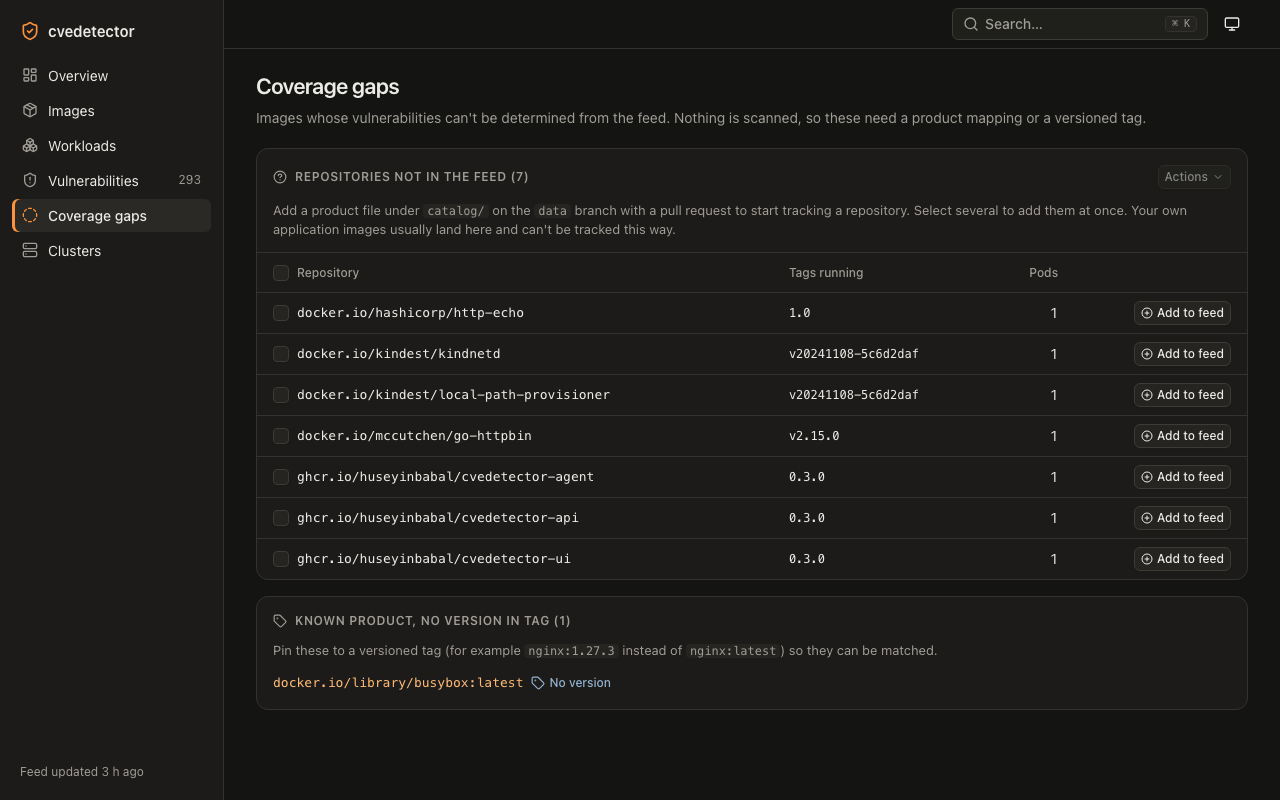
cvedetector knows an image only when the feed maps its repository to a product. This page lists the images it can’t judge.
Repositories not in the feed
Section titled “Repositories not in the feed”Repositories that no product file maps. Your own application images land here. They can’t be tracked this way, because there is no public CVE record for them.
For well-known software, add it to the feed:
- One image: Add to feed opens a product file on GitHub. It is pre-filled with the repository and the tags you run, with the versions read from them. Fill in the NVD CPE and open the pull request.
- Several images: select them (the header checkbox selects all), then Actions → Add to feed. GitHub can’t pre-fill several files at once, so you get three options:
- Download the files as a zip, open the upload page, drop them in and choose Create a new branch and start a pull request.
- Copy a script that writes the files into a checkout of the
databranch. - Request all in one issue, if you don’t know the CPEs. Someone else maps them.
If an image’s name matches a product already in the feed (for example ghcr.io/fluent/fluent-bit and fluent-bit), the dialog suggests adding the image to that product instead.
See Add a product to the feed for the file format.
Known product, no version in tag
Section titled “Known product, no version in tag”The product is known, but the tag carries no version (latest, stable, digest only). Pin these to versioned tags. That’s good practice anyway, and it lets cvedetector match them.